


Lumo
Every moment deserves a soundtrack. Stream and download music on My Zong App and pay from your Zong balance.
About Lumo
Lumo is a music streaming platform that lets you enjoy your favorite music online or download songs to listen offline. Choose from many genres, with the latest hits added regularly. Search quickly for songs, artists and albums, add songs to Favorites and create playlists to enjoy music your way.
Upgrade to Lumo VIP for ad-free listening, lossless audio quality, unlimited song downloads and priority access to exclusive music. Pick a Daily, Weekly, Monthly, Yearly, Family or Student plan and pay with your Zong mobile balance.
Plans and pricing
| Plan | Price (PKR) | Renewal |
|---|---|---|
| Daily | 15 per day | Auto-renews |
| Weekly | 85 per week | Auto-renews |
| Monthly | 280 per month | One-time purchase |
| Student | 195 per month | One-time purchase |
| Family (5 members) | 540 per month | One-time purchase |
| Yearly | 2,800 per year | One-time purchase |
Above prices are inclusive of GST & AIT.
Freemium and VIP
| FREEMIUM USER | VIP USER |
|---|---|
|
Stream and download selected content Catalog coverage up to 99% of the library Limited downloads, favorites and playlist creation Single-device login |
Ad-free experience Full catalog access, including the Lumo Exclusive Catalogue Unlimited downloads, favorites, playlist creation and sharing Priority access to exclusive and first-release content Multi-device login support Cloud storage for user content |
Availability
Lumo is available to Zong customers. Subscribe on the My Zong App (MZA) or through Zong helpline.
How to open Lumo and log in
Log in with your Zong number from inside My Zong App.
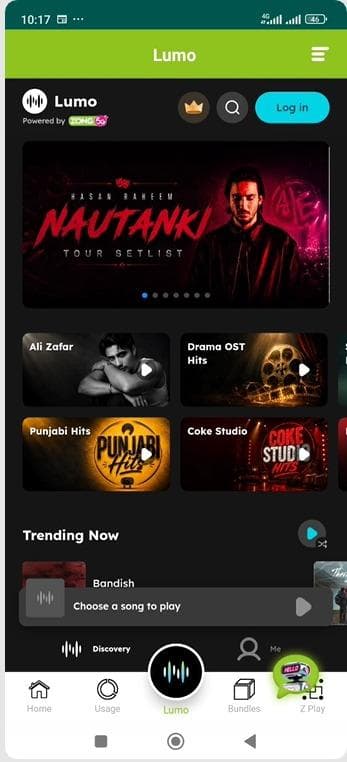
Step 1
Open the My Zong App and tap Lumo in the bottom menu.
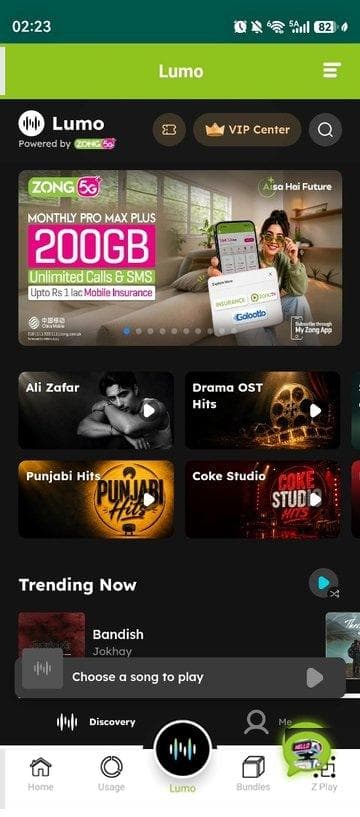
Step 2
You land on the Lumo page inside the app. Tap Log in.
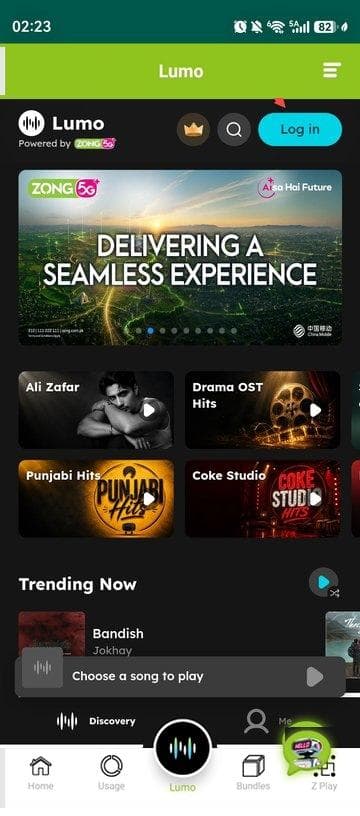
Step 3
Enter your Zong mobile number and tap Continue.
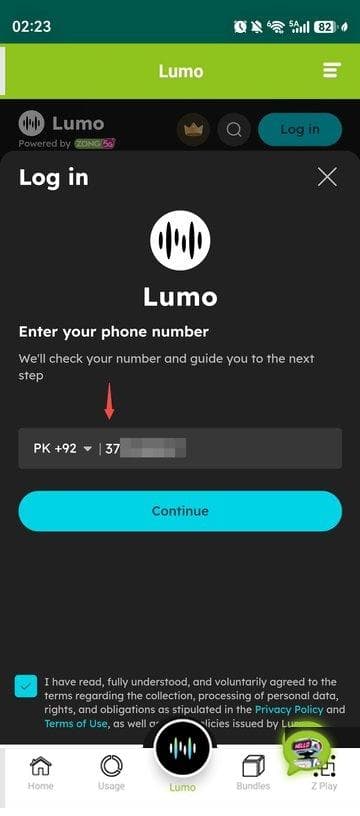
Step 4
Tick the box to accept the terms, then enter the OTP sent to you on WhatsApp.
How to subscribe to Lumo VIP
Once you are logged in, subscribe to a VIP plan in a few taps.
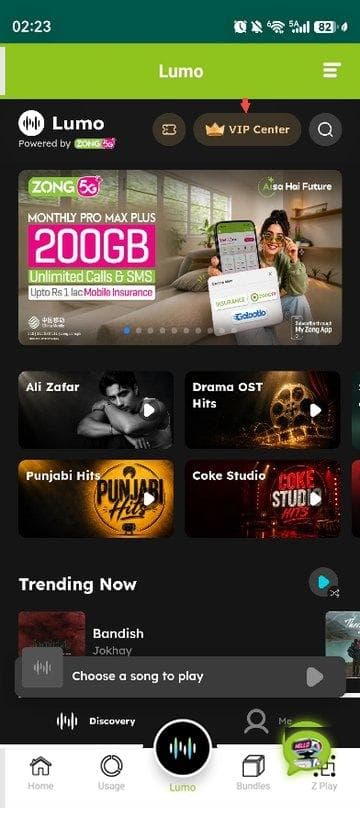
Step 1
On the Lumo page, tap VIP Center.
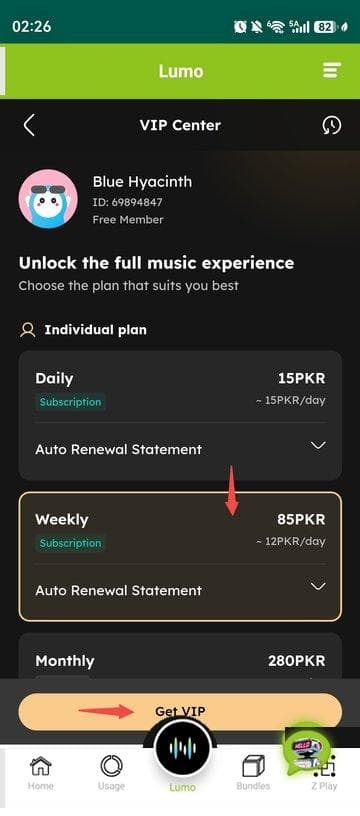
Step 2
Choose a plan and tap Get VIP.
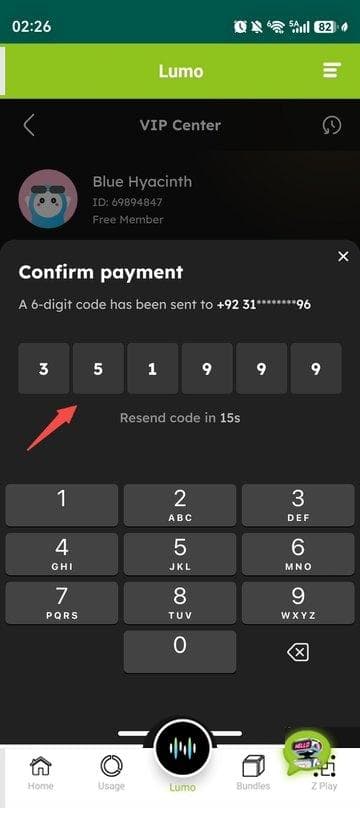
Step 3
Enter the OTP sent to your Zong number.
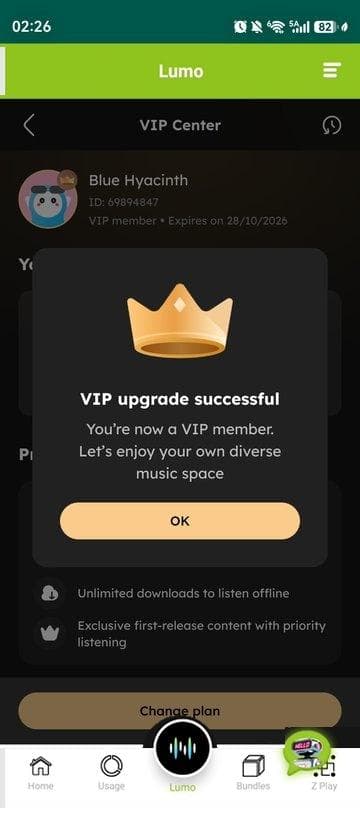
Step 4
A popup confirms your VIP upgrade.
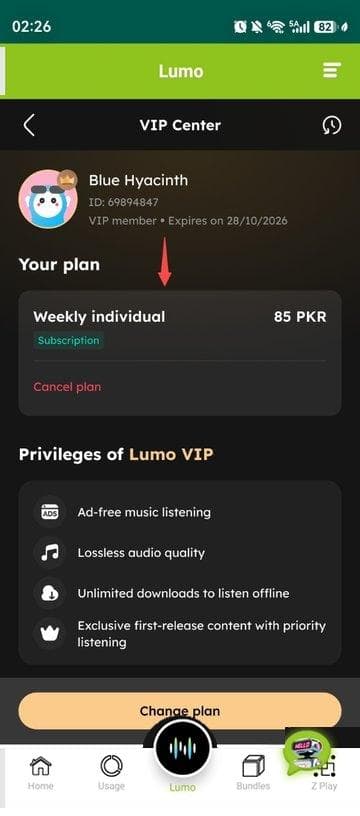
Step 5
VIP Center shows your plan under Your plan.
Subscription channels: MZA App and Zong Helpline
Activation time: Instant
How to unsubscribe
You can cancel any time. Your VIP benefits stay until the end of your current period.
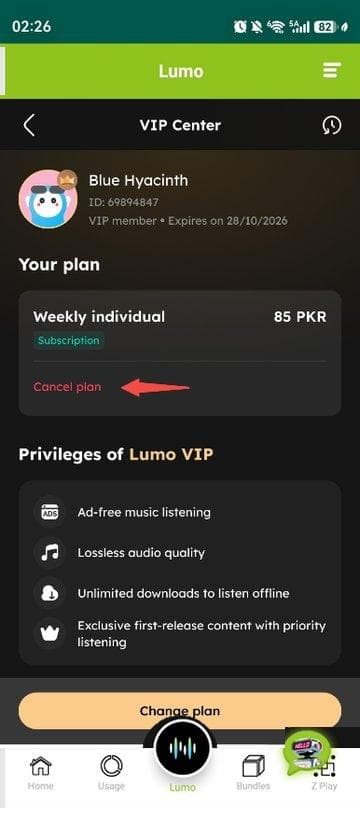
Step 1
In VIP Center, under Your plan, tap Cancel plan.
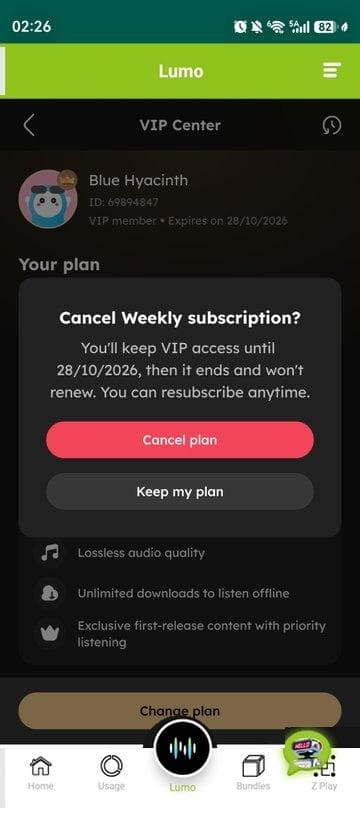
Step 2
On the confirmation popup, tap Cancel plan.
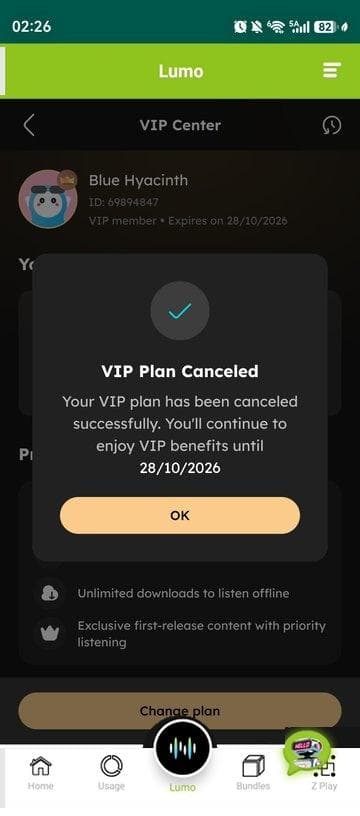
Step 3
A popup confirms the cancellation. Your VIP benefits stay until the end of the current period.
- My Zong App: VIP Center › Cancel plan
- USSD: Dial *6611#
- SMS: Send the UNSUB LUMO X (D-Daily, W-Weekly, M-Monthly, F-Family, S- Student and Y-Year) to 7278
- Zong Helpline: Yes
- Deactivation time: Instant
Frequently asked questions
- Q: What is Lumo?
- A: Lumo is a music (audio and video) streaming app where you discover, stream and download music across many genres.
- Q: Can I listen to music online?
- A: Yes. Stream your favourite songs online through Lumo.
- Q: What types of music are available?
- A: Pakistani classics, Pakistani Pop, Bollywood, Punjabi, Sufi, US-UK, K-Pop, J-Pop, EDM and more.
- Q: Can I listen in the background?
- A: Yes. You can keep listening while you use other apps, subject to your device settings and supported features.
- Q: Can I play music offline?
- A: Download the Lumo app from the App Store or Google Play, then download supported songs to listen offline. VIP lets you download a large library for offline listening.
- Q: How do I find a song?
- A: Use Search to look for songs, artists, playlists, albums or lyrics.
- Q: How do I add a song to Favorites?
- A: Tap the heart icon on a song, playlist or album.
- Q: How do I create a playlist?
- A: Go to the Me page, open the created playlist section and choose to create a new playlist. You can add or remove songs at any time.
- Q: What is Lumo VIP?
- A: Lumo VIP is a premium subscription with ad-free listening, lossless audio, unlimited downloads for offline listening and priority access to exclusive music.
- Q: What is the difference between Freemium and VIP?
- A: VIP users listen without ads, in lossless quality, with unlimited downloads and access to exclusive music. Freemium users get standard audio quality and limited downloads, favorites and playlist creation.
- Q: What VIP plans are available?
- A: Daily, Weekly, Monthly, Yearly, Family and Student.
- Q: How do I pay for VIP?
- A: From your Zong mobile balance. Keep enough balance for the plan you choose.
- Q: How do I know my VIP purchase worked?
- A: Your VIP benefits are active once payment succeeds. Check your status on the VIP Center page.
- Q: Will my VIP renew automatically?
- A: Daily and Weekly plans auto-renew. The other plans are one-time purchases. Check the details of your plan before you buy.
- Q: What if my balance is too low at renewal?
- A: Your plan may not renew. Check your subscription status and balance.
- Q: How do I cancel VIP?
- A: Cancel in VIP Center on Lumo in MZA, dial *6611#, or send the UNSUB code for your plan to 7278. Your VIP benefits stay until the end of the current period.
- Q: How do I check my VIP status and expiry date?
- A: Open the VIP Center page in Lumo.
- Q: Can I change my VIP plan?
- A: Options depend on your current plan and its terms. Open VIP Center for details.
Terms and conditions & Privacy policy
Terms and conditions: https://zong.lumomusic.pk/terms-of-use
Privacy policy: https://zong.lumomusic.pk/privacy-policy
Customer service
Write to us at [email protected] or reach us on Zong helpline.

